
• Skip to primary navigation
  • Skip to main content
  • Skip to primary sidebar
NeuroKnowHow

NeuroKnowHow

Neurodiverse People Who Know How

Menu
  • Home
  • About
    • Close
    • Know about our services
    • Know-how difference
    • Know our experience
    • Know our testimonials
    • Close
  • Know us
    • Close
    • Joseph Aquilina
    • Louise Grimmett
    • Nilsa Abdula
    • Matthew Hancock
    • Victoria Capewell
    • Dr Ross Cooper
    • Dr Elizabeth Capewell
    • Close
  • Our services
    • Close
    • ADHD Coaching
    • Assistive Technology Tutoring
    • Specialist Study Skills Support (SpLD or ASC)
    • DSA Specialist Mentoring (Mental Health)
    • Specialist Mentoring (Autistic Spectrum)
    • Visual Reading course
    • Support for students in Years 10-13
    • Courses & Workshops
    • Close
  • For Needs Assessors
  • Resources
    • Close
    • Information
      • What is Neurodiversity?
      • Adult ADHD Information
      • What is Dyslexia?
      • Dyspraxia & DCD Information
      • DSA Non Medical Helper rates
      • Glossary
    • Questionnaires
      • Adult ADHD questionnaire
      • Adult Dyslexia Questionnaire
      • Adult Dyspraxia Questionnaire
      • Multiple-intelligence questionnaire
    • Freebies
      • Free strategy printouts
    • Policy and Procedures
      • Complaints Policy
      • Complaints Procedure
    • Close
  • News & Blog
  • Connect with us…
    • Close
    • Send us a message
    • Service feedback
    • Login
    • Close
    • Close
    • Close

Assistive Technology

Why don’t you get lost!

15/04/2013 by brain-e

Getting lost and disorientated, is something that happens to many people recognised with neurological differences such as: Dyslexia, Dyspraxia, Aspergers and ADHD; but is that such a bad thing?

Being dyslexic and ADHD, getting lost can be a regular occurrence, this doesn’t always bode well when time is not on your side and you have a meeting to get to. So, if I get disorientated, the numerous applications on my iPhone help me get from place to place, whether travelling on foot, public transport or by car. As of yet, I haven’t learned how to fly a helicopter or aeroplane, but “I’m sure there is an app for that”. However, the thing I’m waiting for the most is the Teleportation app. I imagine that I would be able get my surfboard and gear together (already have a water proof iphone case), find Waikiki beach in Honolulu on my maps app and press the red “Teleport button”. I’m not sure what the EE network charge would be for a human body email attachment.
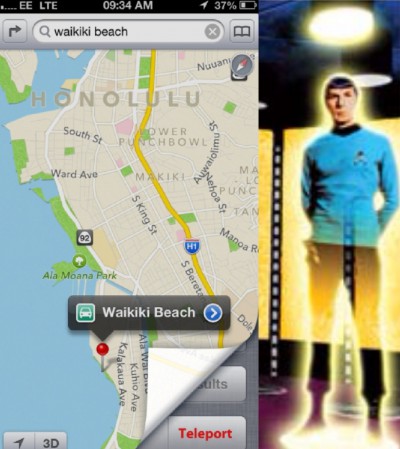
iPhoneSpockBeam image

A consideration must be given to how getting lost, at times, can have its pluses: if you take the route that everyone takes, you will be seeing what everyone has seen; getting lost may allow you to discover something that may have been overlooked. I’m sure Christopher Columbus would have agreed, had he not got lost, one could postulate that we may not have Big Macs or Cadillacs (which in my eyes is not a bad thing!).

Just a thought! The next time you get lost, try not to get anxious, allow yourself to become aware of the environment around you, concentrate on your breath to help you relax. You will be seeing something new, from seeing something new and being aware of these new surroundings your brain is making new connections…. and who knows what you might find?

Here is an of interesting article about orientation and the brain.

Spatial orientation and the brain the effects of map reading and navigation
Filed Under: ADHD/ADD, Aspergers, Assistive Technology, Dyscalculia, Dyslexia, Dyspraxia, Joseph's Blog, Neurodiversity Tagged With: iPhone, orientation

MyBunjee Strap-on for the accident prone and adrenaline junky phones

04/12/2012 by brain-e

The other week my wife and I were discussing iPhone insurance, having hers stolen on the London Underground (mothers of small children, looking flustered due to pushchairs and baby accessories are targets for predatory gadget hunters with no scruples or courage).

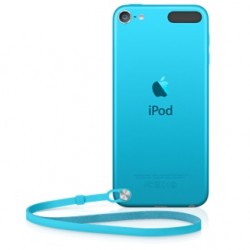
When the iPhone 5 came out, along with the new iPod Touch, a feature the iPod touch came with was the… iHook, iTag or was it iStrapOn… let me check… iPhone Leashthe iPod touch loop… (hmmnn, there already is a product called iLoop). This is great if your an iTouch user, especially since there has been recognition and recommendations for the use of iTouches as a PDA (Portable Digital Assistant) for recipients of the Disabled Student Allowance (DSA). Unfortunately the iPhone 5 didn’t have “the thing that sticks out” that allows for the iLoop attachment. I was looking into alternatives, as I liked the idea of it being attached to me. Some may think that this is a little obsessive, however use of a PDA is essential to help anyone with executive function difficulties to fit into contemporary society.
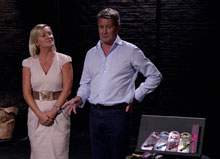
Whilst watching Dragons Den last month, I saw something that I thought would help with the not getting it The Peoplestolen and more. MyBunjee was a product pitched by duo Emma Jones and Mark Ferguson, which got the interest of the dyslexic dragon Duncan Banotyne and the essential winning bid from dragon Peter Jones (a Telecommunications Business expert). The MyBunjee product is essentially something that stops your expensive and delicate smartphone hitting the deck accidentally. With regard to my own smartphone, I had dropped my iPhone 3GS numerous times on wooden floors, pavements and even face planting the phone as it fell out of my pocket, onto the road whilst putting my kids in the car. The amazing thing is, it has never had crack… good luck I think, as luck is a state of mind.
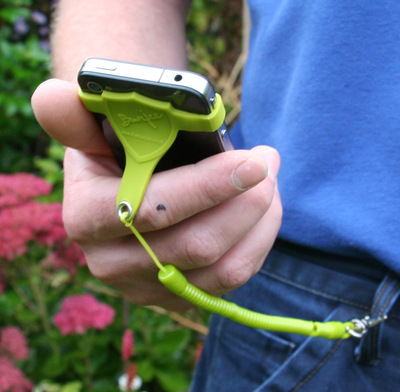
The product solves the problems of it getting lost, misplaced and even as a theft deterrent. With an ADHD diagnosis, an explanation to working memory difficulties is provided; the constant loss of things like keys, pens and the all essential smartphone, can cause a lot of unnecessary stress and anxiety. With dyspraxia the same can apply about losing things, but you also have the higher risk of accidentally dropping these delicate devices, due to motor difficulties. With the above risk factors and their frequent occurrence, insurance can be a costly, unfortunate yet necessary thing to have.

mybunjee-keeps-your-phone-safeThe MyBunjee isn’t a new concept. There are of course those springy key-rings that can be attached to a bunch of keys so that:
    1. They are less likely to get lost or misplaced
    2. They can be lifted to a height that allows them to be used.

It’s the patent-pending rubber band and link to the spring attachment that allows the MyBungee to be adaptable to any PDA type device. They retail around £6 from most websites including postage and packing. I think they are well worth the price as they give you an extra peace of mind, and you can also watch your smartphone do death defying adrenaline junky bunjee jumps, while also looking like an 80s break-dancer or tennis player wearing a head sweatband.

Filed Under: ADHD/ADD, Assistive Technology, Dyspraxia, Joseph's Blog, Neurodiversity Tagged With: ADHD, Dyspraxia, iPhone

Cheatsheet app for learning Apple Keyboard Shortcuts

17/08/2012 by brain-e

Anyone who has received assistive technology tutoring from any of NeuroKnowHow tutors, or know that we strongly advocate the use of keyboard shortcuts. Whether you are a Windows PC user on Apple Mac user, keyboard shortcuts help you to save time and also reduced the risk of developing RSI (repetitive strain injury), and carpal tunnel syndrome; both of which are disabilities in our own right and can make the use of a computer unbearable as well as other day-to-day activities.

All NeuroKnowHow  clients are provided with our PDF toolkit which includes a visual guide and tool for learning keyboard shortcuts for both operating systems.  The idea is that they are printed up and placed in front of you where you use your computer, preferably on the wall and not on the person’s forehead who may sit opposite you. So all depends on where your computer is placed.

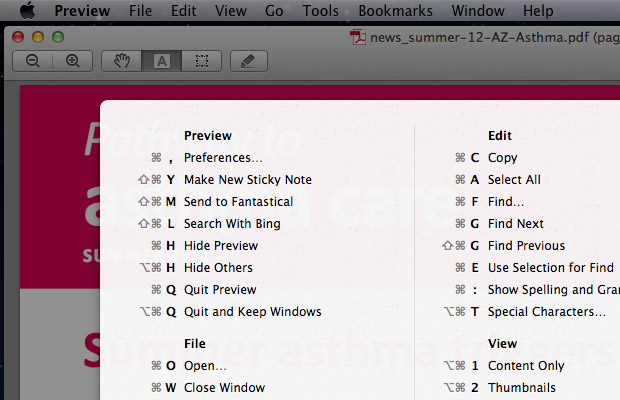
Depending on how many software packages at use there are myriad of  keyboard shortcuts that you could learn. A Swedish developer has created a Cheatsheet app for learning Apple Keyboard Short-Cuts for the Mac OS X 10.7 and above  that allows you to view all the available keyboard shortcuts for the current application that you are using at a click of a button.

After downloading the app, load it up, and it will appear in you dock.

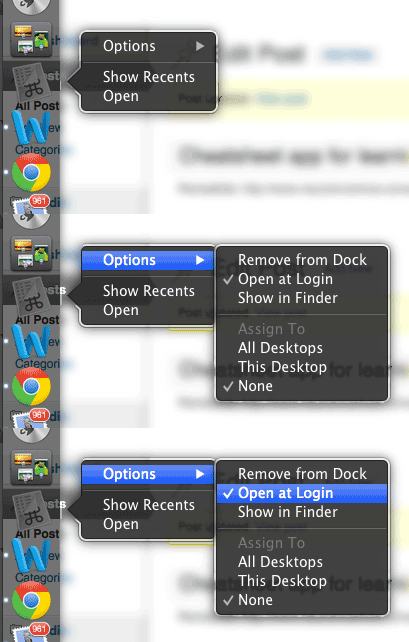
To get the most out of the Cheatsheet app, it should be set, to open up at login. This can be done as the animated gif image below illustrates.

  1. Hold down mouse click on icon
  2. A bubble will appear (as illustrated)
  3. Move across the options and select “open at login”

openatlogin_cheatsheet


It is a really easy way of learning Apple Keyboard Shortcuts and the list of shortcuts change depending on which window you have active or document you are working on.

mac_cheatsheet01

I was going to make a video, but thought I would post a a YouTube video by someone else.

Filed Under: Assistive Technology

Despite technology, reading is still a challenge

27/11/2011 by brain-e

This is quite old news really. Text-to-speech software sounds out words through voice syntheses, all very interesting especially if you would like to sell a computer in the 80s.

If you have a problem with auditory processing (a “symptom” of dyslexia and other neurodiversity types), listen to people talking to me can still lead to some confusing alternative understandings of what has been said. This can lead to argument, confusion, laughter and the dyslexia usual suspect “hurdle”, low self esteem.

It is an agreeable article, however one expects there to something more being said about the failure of text-to-speech software with dyslexic users. Our experience is that it is a great tool for proof reading, but for absorbing and understanding new information have a look at the SuperReading course that we provide and what a change it has made in peoples lives. Including the director of NeuroKnowHow Joseph Aquilina. At the start of the coursehe was amongst the lowest 2% of the UK population for reading speed and comprehension. After completing the 8 to 10 week course, he was amongst those who are better than 61% of the population for reading speed and comprehension, and still improving.

In response to

http://timestranscript.canadaeast.com/lifetimes/article/1458953

Filed Under: Assistive Technology, Dyslexia Tagged With: Assistive Technology, Dyslexia, Reading, SuperReading, Technology

Primary Sidebar

Call us…

  (+44) 07971 714 217

News and blog

  • New Report: Supporting students living with ADHD at University: Working better together
  • Embracing My “Attention Difference Hyperdrive” – Brief journey to Self-Acceptance
  • ADHD Meds May Boost Cognitive Skills Long-Term, But Weigh Pros and Cons
  • 1-1 support over the summer (Dyslexia tuition, ADHD coaching, Autism Mentoring, Mental Health) London and Surrey
  • Embracing neurodivergence
  • “Why have I never been taught this before??!”
  • Celebrating Neurodivergent Voices within UAL

About us

  • Know our services
  • Our Know How
  • Know How Difference
  • Know about our services

Design

With an emphasis on typography, white space, and mobile-optimized design, your website will look absolutely breathtaking.

Learn more about design.

ADHD Info & Checklist

ADHD Questionnaire

From a medical perspective, Attention Deficit Hyperactivity Disorder (ADHD) is a neurobiological … Find out more... about Adult ADHD Information

Dyslexia Info & Checklist

Dyslexia Question Logo

Dyslexia people experience difficulty learning to read fluently while maintaining full … Find out more... about What is Dyslexia?

Dyspraxia Info & Checklist

DyspraxiaLOGO

Developmental coordination disorder (DCD), also known as developmental dyspraxia, is a neurological … Find out more... about Dyspraxia and DCD information

Copyright © 2025 NeuroKnowHow Limited · Log in