
• Skip to primary navigation
  • Skip to main content
  • Skip to primary sidebar
NeuroKnowHow

NeuroKnowHow

Neurodiverse People Who Know How

Menu
  • Home
  • About
    • Close
    • Know about our services
    • Know-how difference
    • Know our experience
    • Know our testimonials
    • Close
  • Know us
    • Close
    • Joseph Aquilina
    • Louise Grimmett
    • Nilsa Abdula
    • Matthew Hancock
    • Victoria Capewell
    • Dr Ross Cooper
    • Dr Elizabeth Capewell
    • Close
  • Our services
    • Close
    • ADHD Coaching
    • Assistive Technology Tutoring
    • Specialist Study Skills Support (SpLD or ASC)
    • DSA Specialist Mentoring (Mental Health)
    • Specialist Mentoring (Autistic Spectrum)
    • Visual Reading course
    • Support for students in Years 10-13
    • Courses & Workshops
    • Close
  • For Needs Assessors
  • Resources
    • Close
    • Information
      • What is Neurodiversity?
      • Adult ADHD Information
      • What is Dyslexia?
      • Dyspraxia & DCD Information
      • DSA Non Medical Helper rates
      • Glossary
    • Questionnaires
      • Adult ADHD questionnaire
      • Adult Dyslexia Questionnaire
      • Adult Dyspraxia Questionnaire
      • Multiple-intelligence questionnaire
    • Freebies
      • Free strategy printouts
    • Policy and Procedures
      • Complaints Policy
      • Complaints Procedure
    • Close
  • News & Blog
  • Connect with us…
    • Close
    • Send us a message
    • Service feedback
    • Login
    • Close
    • Close
    • Close

Cheatsheet app for learning Apple Keyboard Shortcuts

17/08/2012 by brain-e

Anyone who has received assistive technology tutoring from any of NeuroKnowHow tutors, or know that we strongly advocate the use of keyboard shortcuts. Whether you are a Windows PC user on Apple Mac user, keyboard shortcuts help you to save time and also reduced the risk of developing RSI (repetitive strain injury), and carpal tunnel syndrome; both of which are disabilities in our own right and can make the use of a computer unbearable as well as other day-to-day activities.

All NeuroKnowHow  clients are provided with our PDF toolkit which includes a visual guide and tool for learning keyboard shortcuts for both operating systems.  The idea is that they are printed up and placed in front of you where you use your computer, preferably on the wall and not on the person’s forehead who may sit opposite you. So all depends on where your computer is placed.

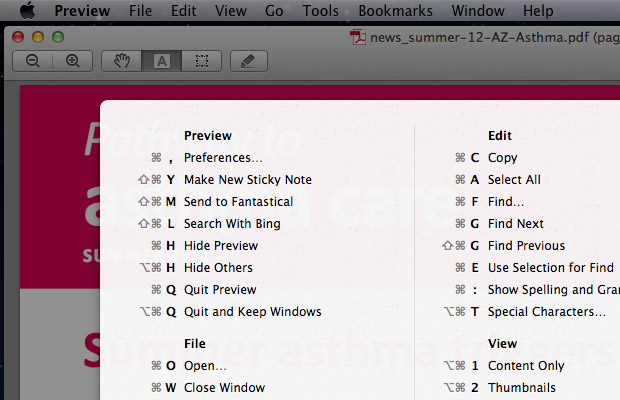
Depending on how many software packages at use there are myriad of  keyboard shortcuts that you could learn. A Swedish developer has created a Cheatsheet app for learning Apple Keyboard Short-Cuts for the Mac OS X 10.7 and above  that allows you to view all the available keyboard shortcuts for the current application that you are using at a click of a button.

After downloading the app, load it up, and it will appear in you dock.

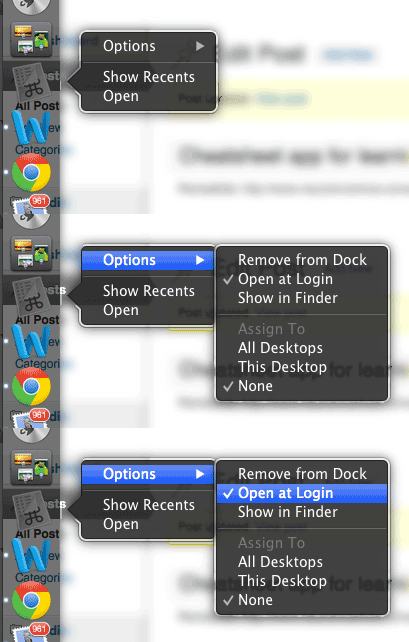
To get the most out of the Cheatsheet app, it should be set, to open up at login. This can be done as the animated gif image below illustrates.

  1. Hold down mouse click on icon
  2. A bubble will appear (as illustrated)
  3. Move across the options and select “open at login”
openatlogin_cheatsheet


It is a really easy way of learning Apple Keyboard Shortcuts and the list of shortcuts change depending on which window you have active or document you are working on.
mac_cheatsheet01

I was going to make a video, but thought I would post a a YouTube video by someone else.

Filed Under: Assistive Technology

Primary Sidebar

Call us…

  (+44) 07971 714 217

News and blog

  • New Report: Supporting students living with ADHD at University: Working better together
  • Embracing My “Attention Difference Hyperdrive” – Brief journey to Self-Acceptance
  • ADHD Meds May Boost Cognitive Skills Long-Term, But Weigh Pros and Cons
  • 1-1 support over the summer (Dyslexia tuition, ADHD coaching, Autism Mentoring, Mental Health) London and Surrey
  • Embracing neurodivergence
  • “Why have I never been taught this before??!”
  • Celebrating Neurodivergent Voices within UAL

About us

  • Know our services
  • Our Know How
  • Know How Difference
  • Know about our services

Design

With an emphasis on typography, white space, and mobile-optimized design, your website will look absolutely breathtaking.

Learn more about design.

ADHD Info & Checklist

ADHD Questionnaire

From a medical perspective, Attention Deficit Hyperactivity Disorder (ADHD) is a neurobiological … Find out more... about Adult ADHD Information

Dyslexia Info & Checklist

Dyslexia Question Logo

Dyslexia people experience difficulty learning to read fluently while maintaining full … Find out more... about What is Dyslexia?

Dyspraxia Info & Checklist

DyspraxiaLOGO

Developmental coordination disorder (DCD), also known as developmental dyspraxia, is a neurological … Find out more... about Dyspraxia and DCD information

Copyright © 2025 NeuroKnowHow Limited · Log in